
Managing employees, tracking their attendance, processing their payroll, managing their leave requests, etc. can be difficult for organizations that rely on paper-based systems to track these functions. The larger an organization grows, the more organized its HR processes will need to be to process all the employees’ information and daily HR duties. That is why organizations turn to Digital HRMS (Human Resources Management Systems) for assistance with these functions.
The term HRMS Globex refers to an employee management system that integrates various human resources tasks into a single system. The system will help streamline daily HR functions as well as provide employees with a simple and convenient method of accessing their employment-related information.
Introduction to HRMS Globex
Human Resources Management is critical to the effective operation of all organizations. HR departments perform many tasks daily including recruiting employees, administering employee benefits, and tracking employee attendance.
Digital HR systems provide organizations with a way to eliminate many of the issues that result from manually managing these processes. Many organizations have experienced increased paperwork, communication breakdowns and errors when they manually manage these processes. Digital HR systems bring all employee data into a centralized location.
HRMS Globex is the program that uses the above mentioned strategy for managing your employees. The system will give you a well structured environment to manage all of your various HR functions, such as keeping track of each employee’s data, processing payroll, recruiting new employees, reviewing employee performance, and managing employee leaves.
What Is HRMS Globex?
HRMS Globex is an HR management system that allows companies to use a digital platform to complete many of the different types of work related to their employees.
An HRMS allows users with authorization to view information about employees such as attendance, salary, employee data and leave requests, rather than having individual systems for each.
The system was designed for both employees and HR departments. Employees have access to the system through various self-service tools, and HR departments are able to administer and track employee information and complete other administrative tasks.
Some of the major areas associated with an HRMS include:
- Employee information management
- Recruitment and onboarding
- Attendance and working-hour records
- Leave application management
- Payroll and salary administration
- Employee performance tracking
- Training and development
- Reports and workforce analytics
The feature availability is based on which organization uses the system.
Key Features of HRMS Globex
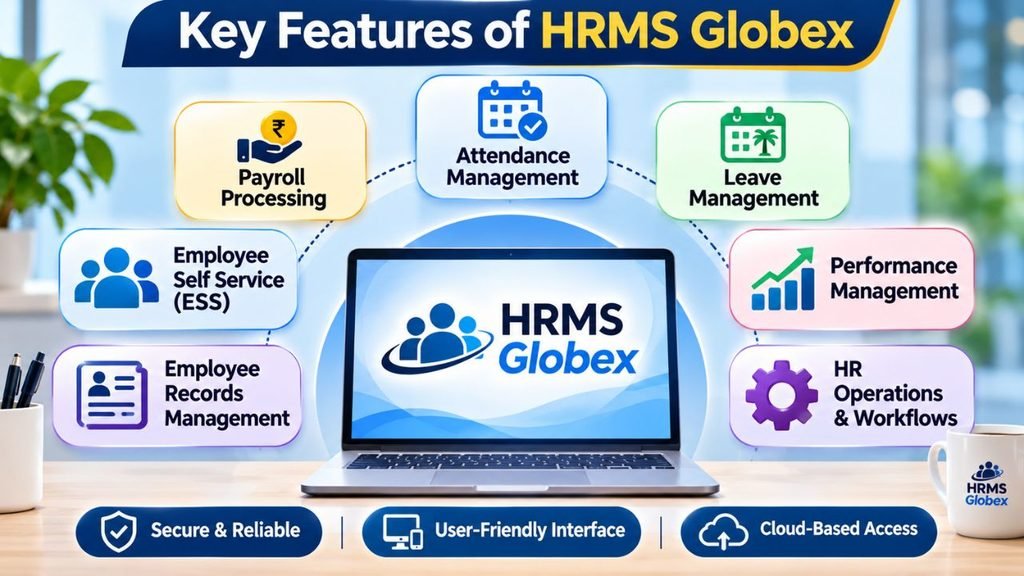
A human resource management platform becomes useful when it simplifies everyday workplace activities. HRMS Globex is associated with several important HR management functions.
The following table explains the major features and their potential uses.
| Feature | Description |
| Employee Management | Maintains employee information and professional records. |
| Recruitment | Helps organise job applications and hiring activities. |
| Onboarding | Supports the process of introducing new employees to an organisation. |
| Payroll Management | Helps manage salary information, deductions, and compensation records. |
| Leave Management | Provides a structured process for submitting and tracking leave requests. |
| Performance Management | Supports employee evaluation and performance reviews. |
| Learning and Development | Helps organise employee training and skill development. |
| Employee Self-Service | Allows employees to access permitted personal and employment information. |
| Reporting and Analytics | Helps HR teams review workforce information and generate reports. |
These functions can reduce repetitive administrative work and improve coordination between employees and HR departments.
How to Access the HRMS Globex Login Portal
Employees are usually issued a valid login ID/password in order to sign-on to a Human Resources Management System (HRMS) application. This user ID/password can be assigned to the employee through their organization’s HR department or their system administrator.
Before you try to log into the system, make sure that you know what your registered user name or employee identification number is and that you also remember your password.
Follow these general steps to access the portal:
- Open the HRMS Globex login page provided by your organisation.
- Wait for the login interface to load.
- Enter your registered username or employee identification details.
- Type your password carefully.
- Check the information to avoid typing mistakes.
- Click the Login or Sign In option.
- After successful authentication, access the dashboard and available services.
Important: Please use the official login URL provided to you by your employer. Do not enter employee login information into any site that you cannot verify as being official.
Step-by-Step HRMS Globex Login Process
The login process is generally straightforward, but first-time users may need assistance from their HR administrator.
| Step | Action | Purpose |
| Step 1 | Open the authorised portal | Access the employee login page. |
| Step 2 | Enter employee ID | Identify your employee account. |
| Step 3 | Enter password | Authenticate your identity. |
| Step 4 | Complete verification, if required | Provide additional security confirmation. |
| Step 5 | Select Login | Enter the employee dashboard. |
| Step 6 | Choose the required module | Access available HR services. |
Employees should verify their profile information upon logging in, and get used to navigating around the dashboard.
The menu selections available will depend on the employee’s department, title and assigned permissions.
How to Reset Your HRMS Globex Password
When employees have access to several different types of work-related computer programs, it can be easy for them to forget their passwords. To help resolve this issue, most human resource management system (HRMS) login procedures offer some type of password recovery feature or an administrative-assisted password reset procedure.
If your login page offers a Forgot Password option, follow these steps:
- Open the authorised HRMS Globex login page.
- Click on Forgot Password.
- Type the employee code or registered identification details that are being asked of you by the system.
- Submit the information.
- Check your registered email for password recovery instructions.
- Open the password reset link, if provided.
- Create a new password according to the displayed requirements.
- Return to the login page and sign in again.
If you have not received an email with recovery instructions, please check your spam folder and ensure the email address you registered with us is accurate.
In the event that you cannot access the recovery site, please contact either your organization’s human resources (HR) department or its Information Technology (IT) administrator.
Employee Dashboard and Its Main Functions
The employee dashboard is a crucial component of a human resource management system (HRMS), providing access to various employment-related services through a single portal.
Depending upon the configuration of the employee’s system, there are many different options that will be available to them regarding their own personal information, including but not limited to, salary, leave, attendance, and company updates.
| Dashboard Section | Main Purpose |
| My Profile | View personal and employment information. |
| Attendance | Review attendance and working-hour records. |
| Leave | Apply for leave and check application status. |
| Payroll | Access available salary-related information. |
| Documents | View or download permitted employment documents. |
| Notifications | Receive important workplace updates. |
| Performance | Review available performance-related information. |
An organised dashboard saves time because employees do not have to search through multiple departments to find basic employment information.
Attendance Management and Daily Work Tracking
Employee attendance tracking is one of the most important functions of Human Resource (HR) departments. Organizations must maintain accurate records regarding employee work schedules, unexcused absences, late arrivals, and requests for attendance adjustments.
The HRMS will make the process easier to maintain digital records of employee attendance.
Depending on the available configuration, employees may be able to:
- View daily attendance records.
- Check monthly attendance summaries.
- Review working hours.
- Identify missing attendance entries.
- Submit attendance correction requests.
- Track attendance-related approvals.
An employee who forgets to record their presence for a given day will have access to a correction request feature provided by the organization. The employee’s human resources department or reporting manager will review the request in accordance with the company’s policies.
This process will improve record keeping, and reduce confusion when preparing payroll.
Leave Management and Application Process
Another major feature of employee management systems is the ability to manage leave. Rather than employees having to email individual leave requests to their manager, they can use an online application process to request time off.
A typical leave application process includes the following steps:
- Log in to the authorised employee portal.
- Open the leave management section.
- Select the available leave application option.
- Choose the appropriate leave category.
- Enter the leave start date and end date.
- Add a reason or supporting information if required.
- Review the application carefully.
- Submit the request for approval.
- Check the application status through the portal.
| Leave Type | General Purpose |
| Casual Leave | Used for personal requirements. |
| Sick Leave | Used when an employee is unwell. |
| Earned Leave | Accumulated leave according to company policy. |
| Privilege Leave | Leave provided under organisational rules. |
| Emergency Leave | Used for unexpected personal situations. |
The available leave categories and approval rules depend on the employer.
Payroll Management and Salary Details
The process of managing payroll includes determining how much money employees will be paid for their work, as well as keeping track of all compensation related data. Payroll can consist of a number of different types of compensation including base pay, benefits, deductions, bonuses, and relevant tax information.
HRMS is an effective tool for organizing payroll data, allowing HR professionals to minimize the amount of manual calculation needed.
In addition, employees can access some payroll services via their employee dashboard.
Common payroll-related facilities include:
- Monthly salary information
- Salary structure details
- Allowance and deduction records
- Payroll statements
- Tax-related information
- Salary slip access
Employees need to frequently check on their pay information and report to the payroll department when there are errors in deductions or missing payments.
Employee Information and Personal Profile Management
Accurate records of employees are critical to many aspects of business operations, including but not limited to payroll, communications, compliance, and administration.
An HRMS provides a centralised way to organise employee records.
The information may include:
| Information | Examples |
| Personal Details | Name, date of birth, and contact information |
| Employment Details | Employee ID, designation, and department |
| Contact Information | Mobile number and email address |
| Banking Details | Salary account information |
| Professional Details | Joining date and employment history |
| Emergency Details | Emergency contact information |
Employees should ensure that their information is accurate. Any changes to sensitive information, such as bank account details, should follow the organisation’s verification process.
How to Download Salary Slips and Other Documents
The salary slip is an essential part of an individual’s work record. Individuals will likely require a salary slip to apply for loans, rent property, plan financially, etc.
If you have the option to download salary slips from your organization’s portal, then the overall process for doing so would be:
- Open the authorised HRMS Globex portal.
- Log in using your employee credentials.
- Navigate to the Payroll or Salary section.
- Find the Salary Slip or Payslip option.
- Select the required salary month.
- Open the available document.
- Select Download or Export if the option is available.
- Save the PDF file securely on your device.
Depending on how the organization is set up, there may be other employment-related documents that are available. Examples of these could include appointment letters, employment certificates, and tax-related documents.
Benefits of Using HRMS Globex for Employees
Digital HR management systems offer several advantages for employees.
Employees have easy access to employment related information, so they do not need to contact HR each time they require this type of information.
Online Leave Request Processing & Document Access Saves Time.
Better Transparency: Employees will have access to tracking their leave requests as well as viewing available data for attendance and payroll.
Improve employee communication with workplace updates using notifications and announcements.
Convenient Access to Your Employment Records: The use of digital technology has made finding and downloading your most critical employment documents much simpler.
Benefits of HRMS Globex for HR Departments
The management of the administrative duties that are carried out by the human resources department may be difficult if they are done on a manual basis due to the growth of the organization.
A centralised HRMS can help improve operational efficiency.
| Benefit | How It Helps HR Teams |
| Reduced Paperwork | Minimises dependence on manual records. |
| Better Data Management | Keeps employee information organised. |
| Faster Administration | Simplifies repetitive HR activities. |
| Improved Reporting | Supports workforce analysis and reporting. |
| Performance Tracking | Helps organise employee evaluation activities. |
| Recruitment Support | Makes hiring and onboarding activities easier. |
| Better Coordination | Improves communication between departments. |
HR professionals will be able to devote more of their working hours to employee engagement, workforce planning and organizational development by having automated the processes of doing things over and over again.
Common HRMS Globex Login Problems and Their Solutions
When employees are trying to log into an employee management system, they can have difficulty logging in. There are many reasons why an employee could have difficulty logging in. Some of those reasons include having the wrong password/user name, browser problems, internet connection issues and/or account limitations.
Here are some common problems and their possible solutions.
| Login Problem | Possible Solution |
| Incorrect Password | Recheck your password or use the password recovery option. |
| Invalid Employee ID | Verify your employee ID with HR. |
| Page Not Loading | Check your internet connection and refresh the page. |
| Account Locked | Contact the system administrator for assistance. |
| Forgot Password | Follow the available password reset procedure. |
| Browser Issues | Clear browser cache or try another updated browser. |
| Verification Problem | Check your registered email or mobile number. |
If the problem continues, contact your company’s IT support team rather than repeatedly attempting to log in.
Is HRMS Globex Safe and Secure?
Confidentiality is a major concern when designing employee management systems because they contain highly sensitive data such as employees’ social security numbers, pay stubs, past employers’ contact information, and many other types of sensitive documents. Security must be taken into account when creating these systems.
The safety of a company’s Human Resource Management System (HRMS) will depend on the actions taken by both the employer and the software vendor.
Employees should follow these basic precautions:
- Always use the authorised login address.
- Never share your password with another person.
- Create a strong password that is difficult to guess.
- Avoid logging in through public or unsecured Wi-Fi networks.
- Log out after using a shared computer.
- Do not download employee documents on unknown devices.
- Report suspicious login activities to the IT department.
Organisations should additionally use appropriate access controls, secure authentication, data protection methods and perform periodic security reviews.
Tips for Using the HRMS Globex Portal Effectively
Employees will find greater benefit in their HRMS if they take time to understand all of the system’s functions and use them often.
Consider these practical tips:
Keep your profile up to date: Check to see if your contact info and other employee info is accurate.
Review Your Attendance Records: Use the records of your attendance to see where you have missed entries.
- In order to minimize delay in the processing of your request, please submit your planned leave requests as soon as possible.
- Download Essential Documents: Make sure to make copies of your salary slips and other vital employment-related documents.
- Monitor Notifications: Check the dashboard for important HR announcements.
- Don’t Share Your Login Information: Keep your username and password private and never share it with anyone who is not authorized.
- Contact HR when you need help: If you can’t get into a critical system, ask for help.
Using some of the methods listed above will allow for easier day-to-day employee management, as well as greater organization.
FAQ About HRMS Globex
1. What is HRMS Globex?
HRMS Globex refers to an employee management system associated with handling different human resource activities. It brings employee-related functions into a digital environment, helping organisations manage HR operations more efficiently.
2. How can I log in to HRMS Globex?
Visit the authorised login page provided by your organisation. Enter your registered employee ID or username and password, then select the login option to access the available dashboard.
3. What should I do if I forget my HRMS Globex password?
Use the Forgot Password option if available. Follow the recovery instructions sent to your registered email address. You can also contact your HR department or system administrator.
4. Can I apply for leave through HRMS Globex?
If your organisation has enabled the leave management feature, you may be able to submit leave applications online, select leave dates, and check the approval status.
5. Can employees download salary slips through HRMS Globex?
Salary slip access depends on the payroll facilities enabled by your employer. If available, employees can generally find the required document under the Payroll or Salary section.
6. Is HRMS Globex available on mobile phones?
Mobile accessibility depends on the portal’s configuration. If the login interface supports mobile browsers or an authorised mobile application, employees may be able to access available services through their smartphones.
Conclusion
HR management is a very important part of how you run your business. Using digital platforms will allow you to do things like track employee data, handle payroll, take attendance, hire new people, and handle employee time off in a much easier way than before.
The HRMS Globex system provides an organization with a central repository of employee data and offers a variety of employee-related services and administrative functions. The employee-related services offered by the HRMS Globex system may provide employees with greater ease in performing their daily duties and may help organizations decrease the amount of repetitive administrative work performed by their HR department.
Also Read: What Does OTW Mean in Text? | ATP Meaning in Text | RD Meaning in Text